spacetab

Customer display and web analytics for Teboil filling stations

Project completed, 2023–2025

For Direct Vision: a second screen at the till shows the purchase, a QR code for payment via the Faster Payments System and ads, while the web analytics panel shows tank stock, fuel and shop sales, pump meter faults and mobile fuelling across the whole network.

Client and task

Direct Vision works with the Teboil filling station network. The station till publishes the current purchase to a local service, and a shared statistics database collects tank gauge readings, fuel dispenser transactions, shop receipts and fuel orders from partners' mobile apps.

We had two tasks. The first was a web version of the customer display: a second monitor at the till in kiosk mode where the customer sees what the cashier rings up, pays with a Faster Payments QR code and gets a QR code of the fiscal receipt, with ads running between purchases. The second was a web panel on top of the statistics database, where the network and its staff see the data by station, day and fuel type, and meter faults are found without manual checks.

What we built

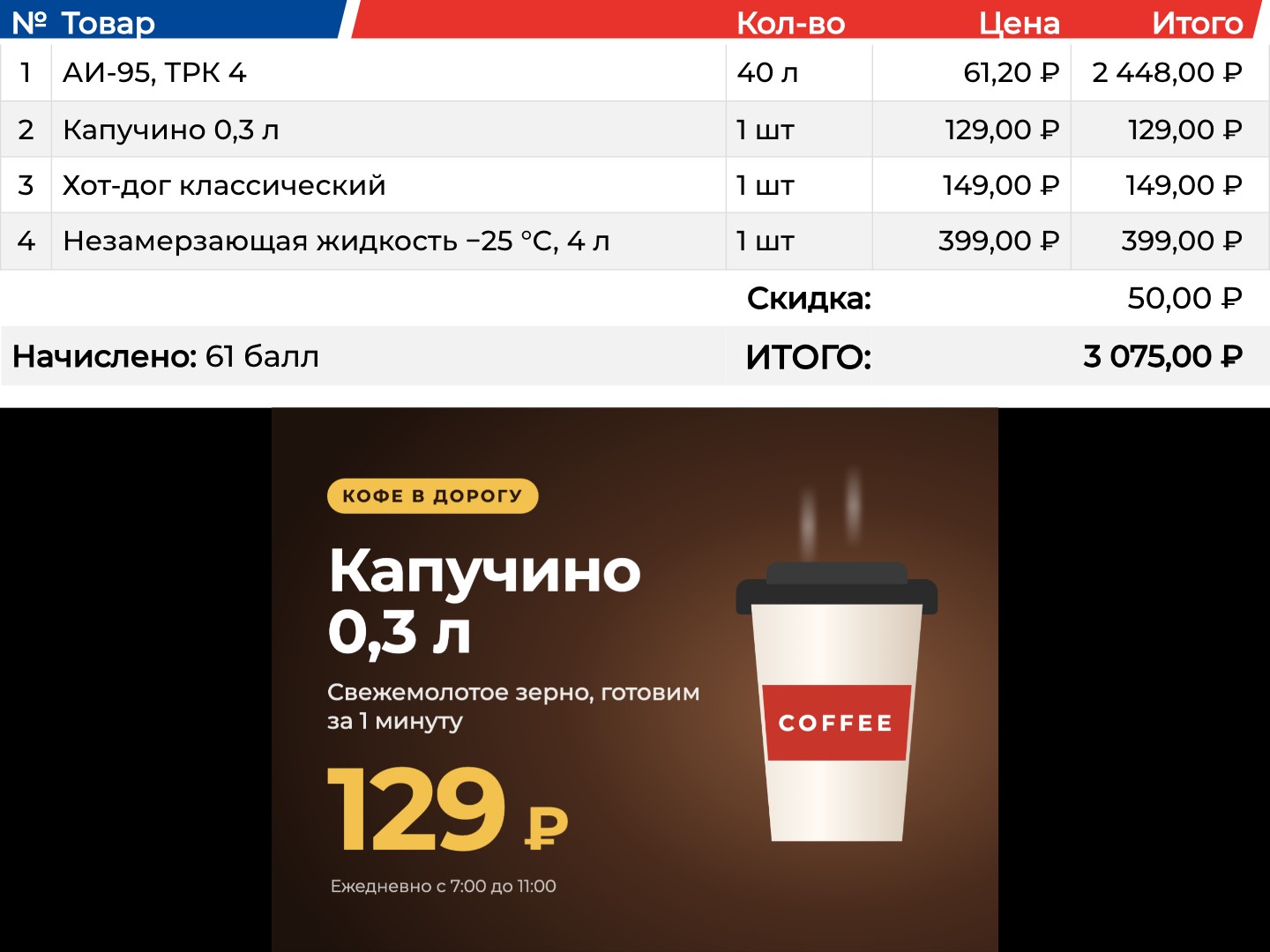
Customer display: a four-item receipt with fuel, coffee, a hot dog and washer fluid, discount, points and total, with an ad below

The receipt on the customer display

The second screen mirrors the purchase as the cashier rings it up: items with quantity and price, the discount, loyalty points earned and the total. The receipt table is at the top, and the ads keep running below it. Every two seconds the screen asks the till's local service for the data of its workstation number.

The customer sees what they are paying for before they pay.

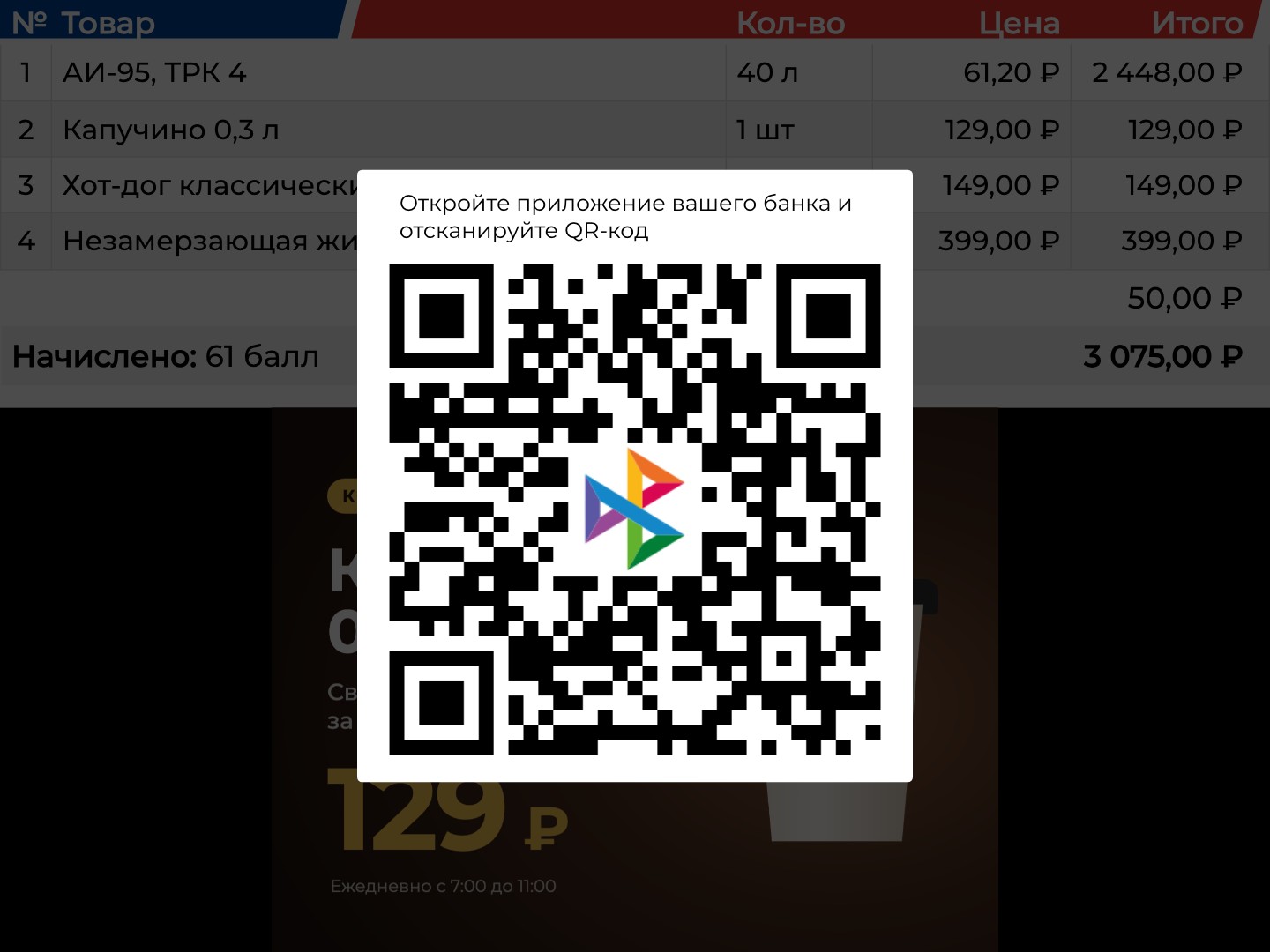
Faster Payments: a QR code with the system's logo on top of the receipt

Payment by Faster Payments QR code

When the cashier chooses a Faster Payments payment, a large QR code with the system's logo and the hint “Open your banking app and scan the QR code” appears on top of the receipt.

The customer pays with a phone right at the till, without a card or a terminal.

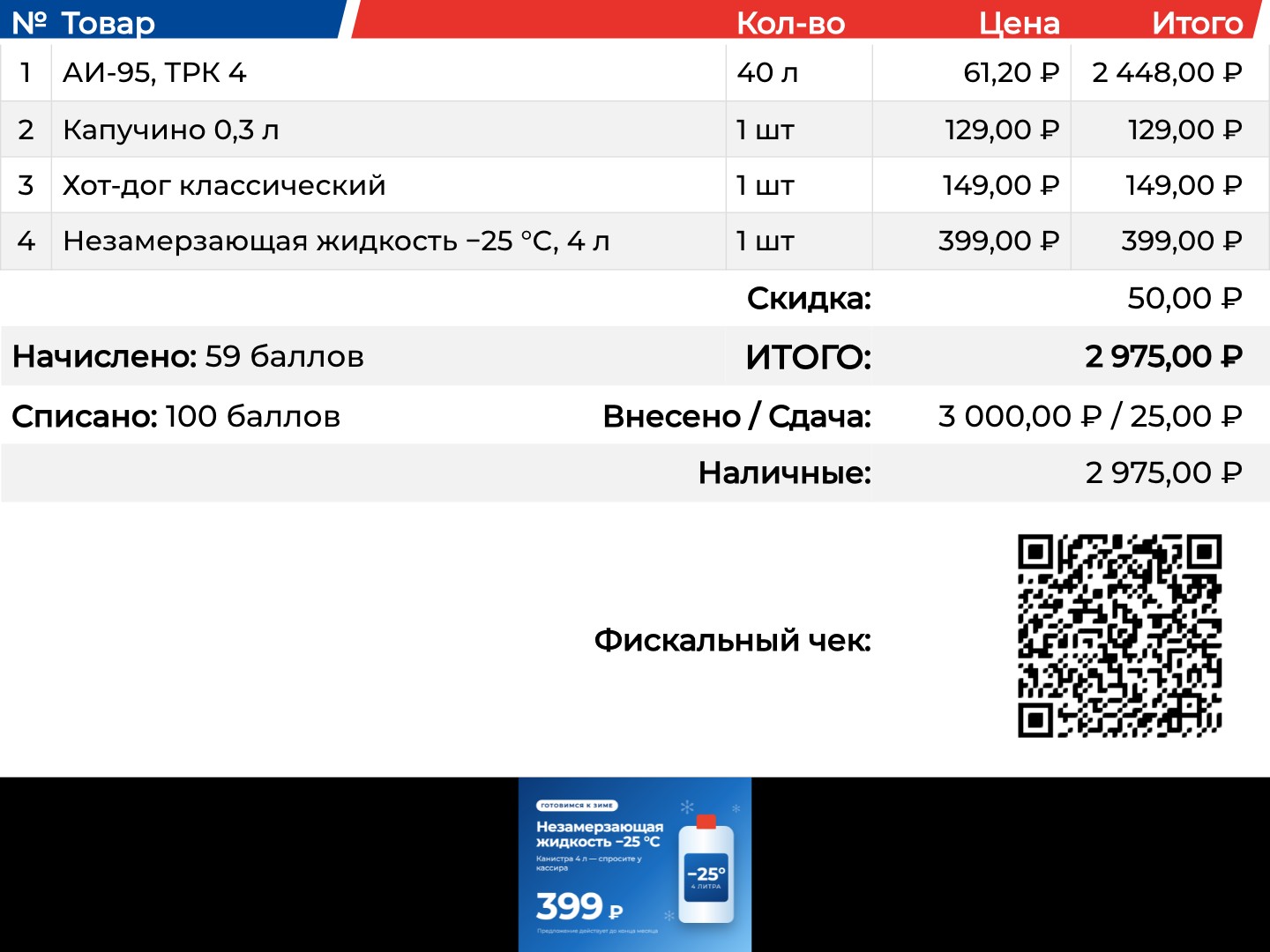
Closed receipt: points redeemed, cash and change, payment method and the fiscal receipt QR code

The closed receipt and the fiscal QR code

After payment the screen shows points redeemed, cash handed over and change, payment methods and a QR code of the fiscal receipt that the customer scans with a phone. Then the screen returns to ads.

Everything on the paper receipt is on the screen, and the customer can take it in their phone.

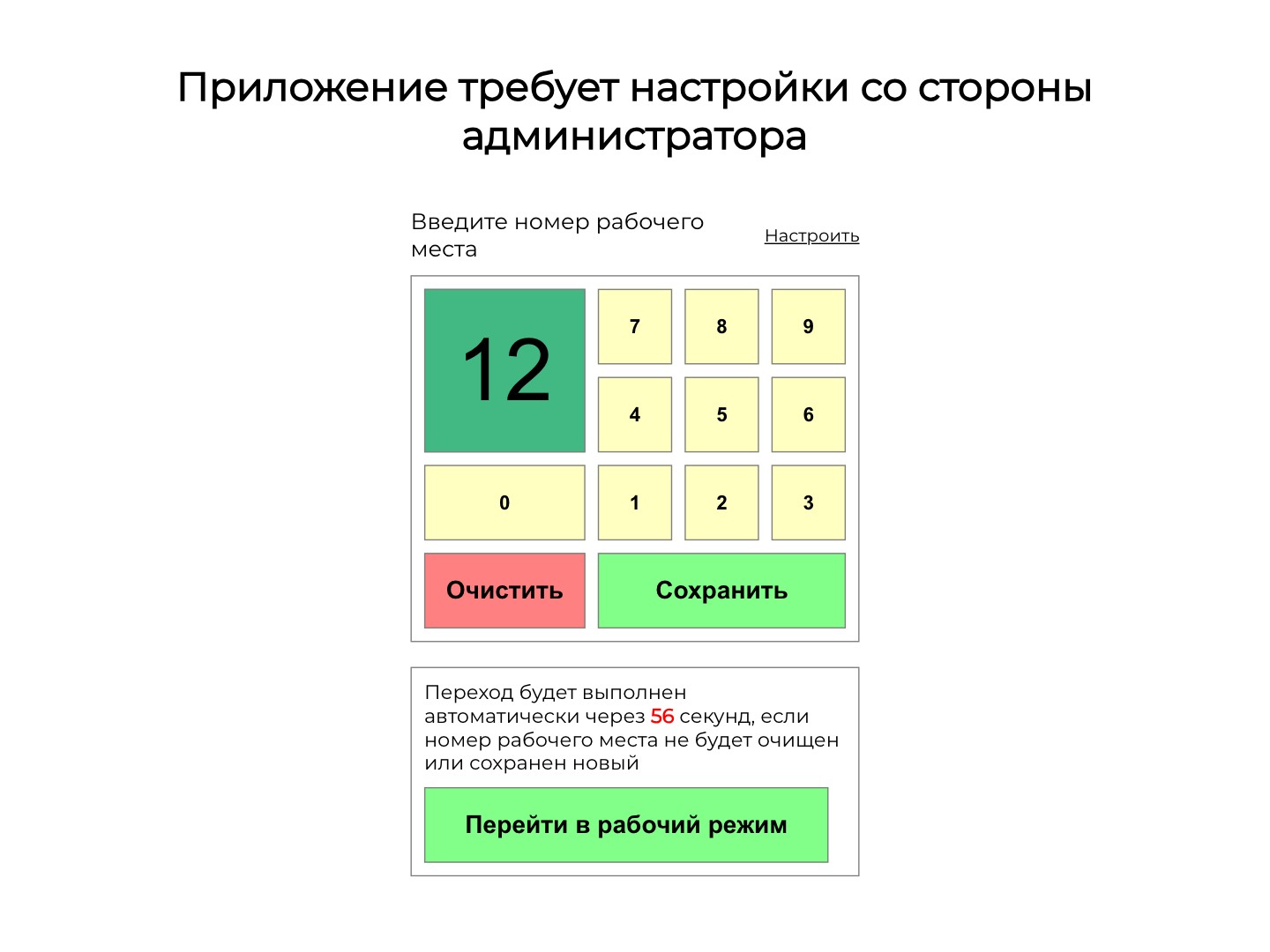
First launch: workstation number on an on-screen keypad and automatic switch to working mode

Workstation setup on the screen itself

On first launch the screen asks for the workstation number: an administrator enters it with on-screen buttons and saves it, and after 60 seconds the screen switches to working mode by itself. An inconspicuous corner area leads back to setup, which also holds the local service address, the logo link and a cache reset.

The screen goes on any till without a keyboard or a separate program.

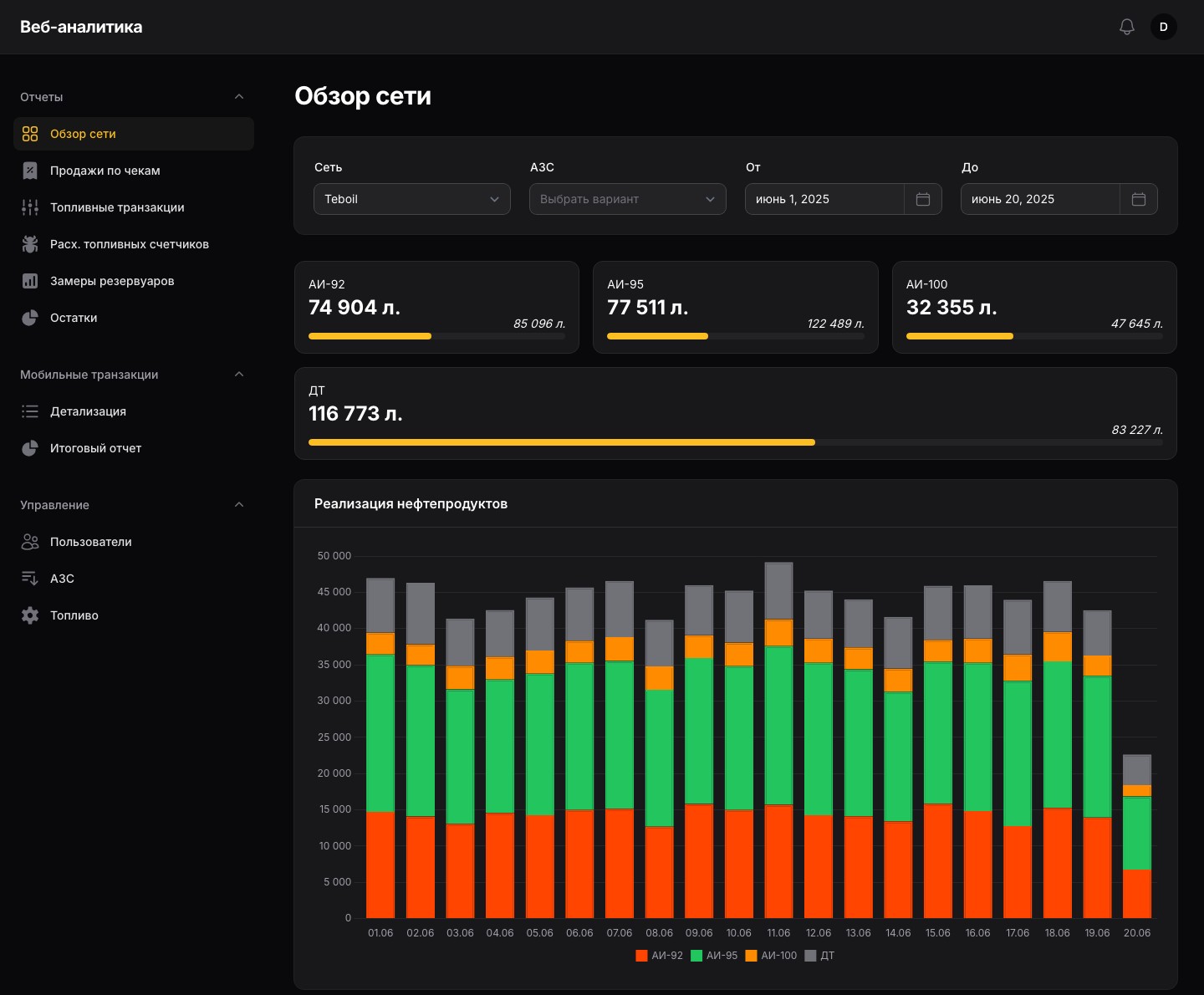
Panel network overview: stock by fuel type and daily fuel sales for June

Network overview

Stock of each fuel type across all the network's tanks with the space left to full, fuel sales by day as bars and as a table in litres and roubles with a total for the period. Filters: network, station and dates.

Sales and stock of the whole network on one screen.

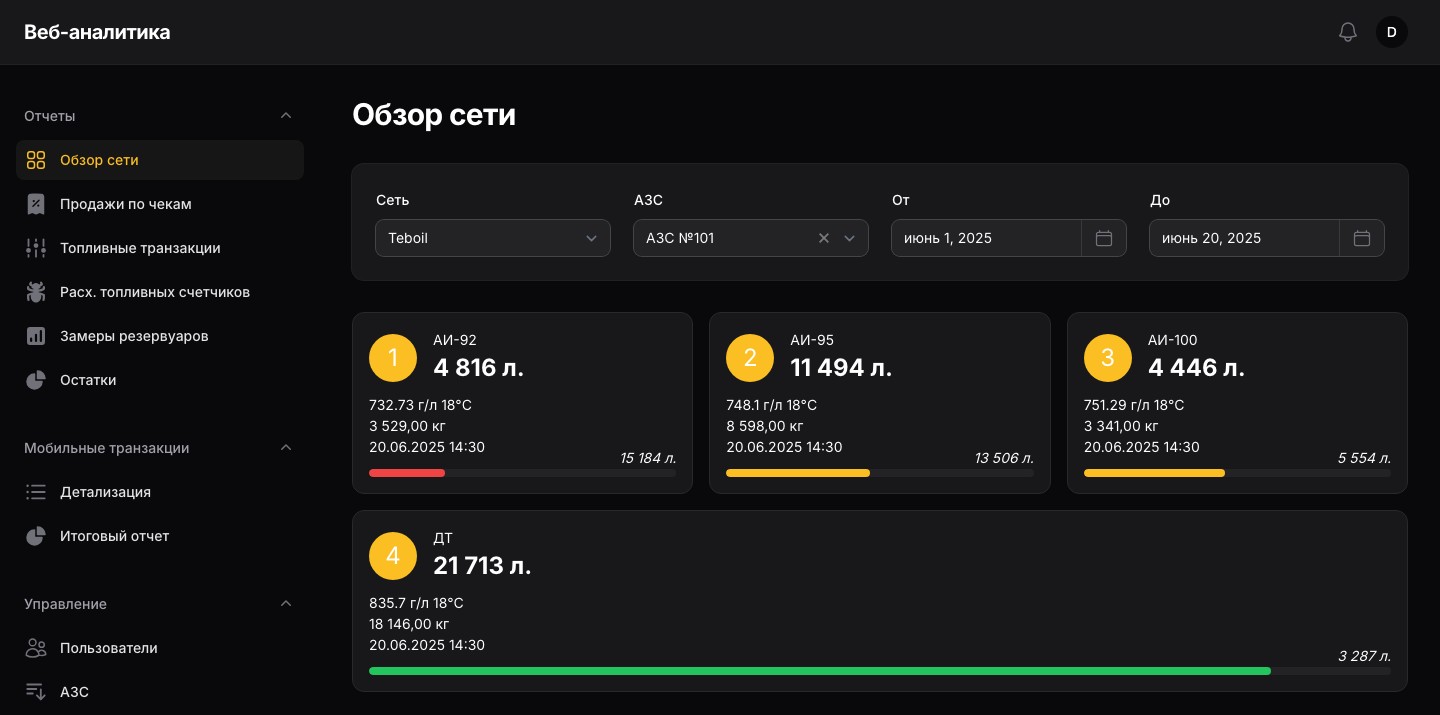
Station tanks: volume, density, temperature, mass, reading time and colour-coded fill bars

Station tanks

Pick a station and every tank gets its own card: fuel, volume, density, temperature, mass, time of the latest reading and free volume. The fill bar turns yellow below 50% and red below 30%, and the card leads to the readings chart of that tank.

It is clear at once which tank needs refilling.

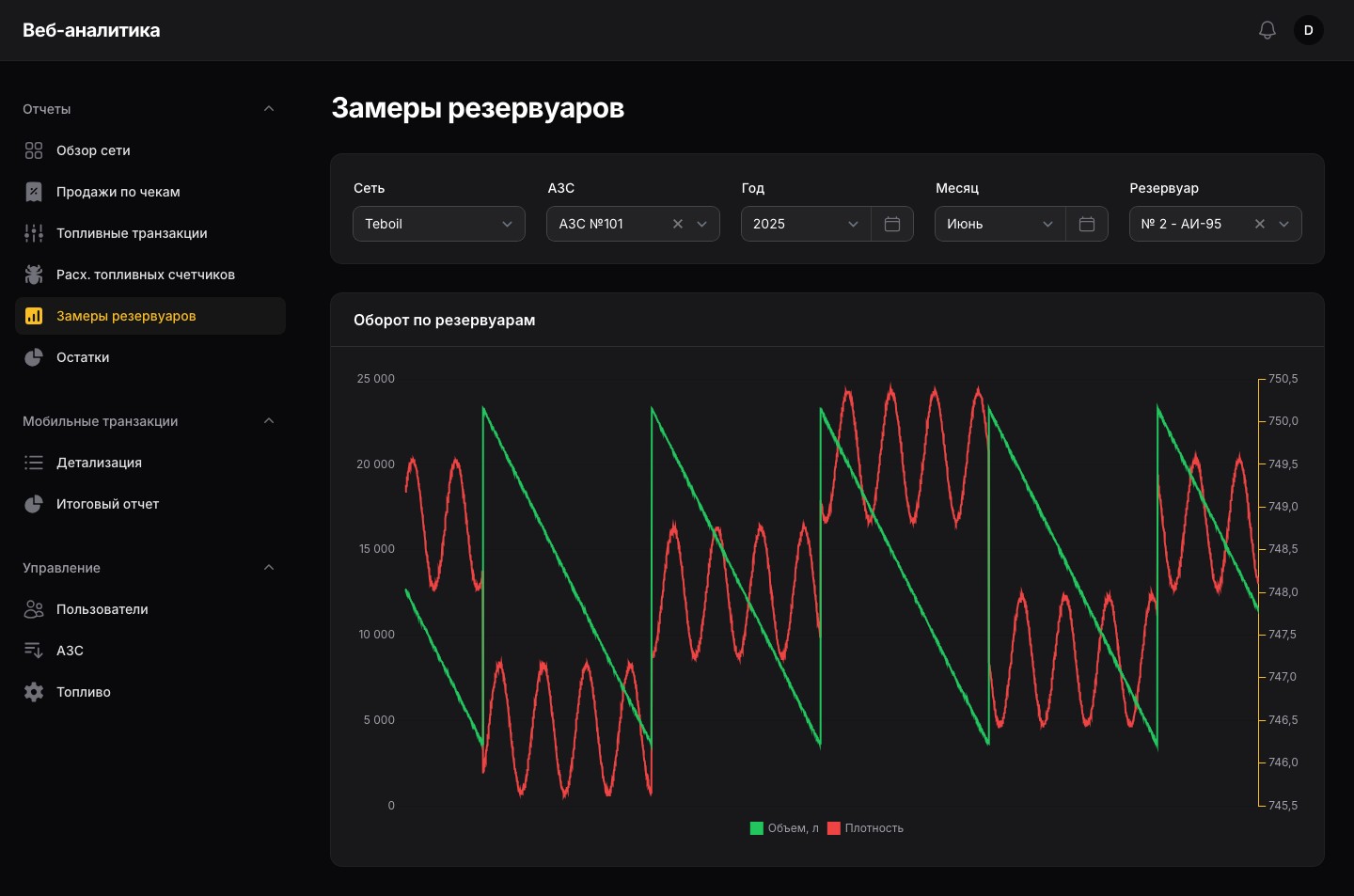
Tank readings: volume and density of the AI-95 tank for June, showing consumption and deliveries

Tank readings

A month chart for the selected tank: volume from the level gauge and density on a second axis. The sawtooth shows consumption and every delivery.

Fuel consumption and deliveries are checked on a chart, without database exports.

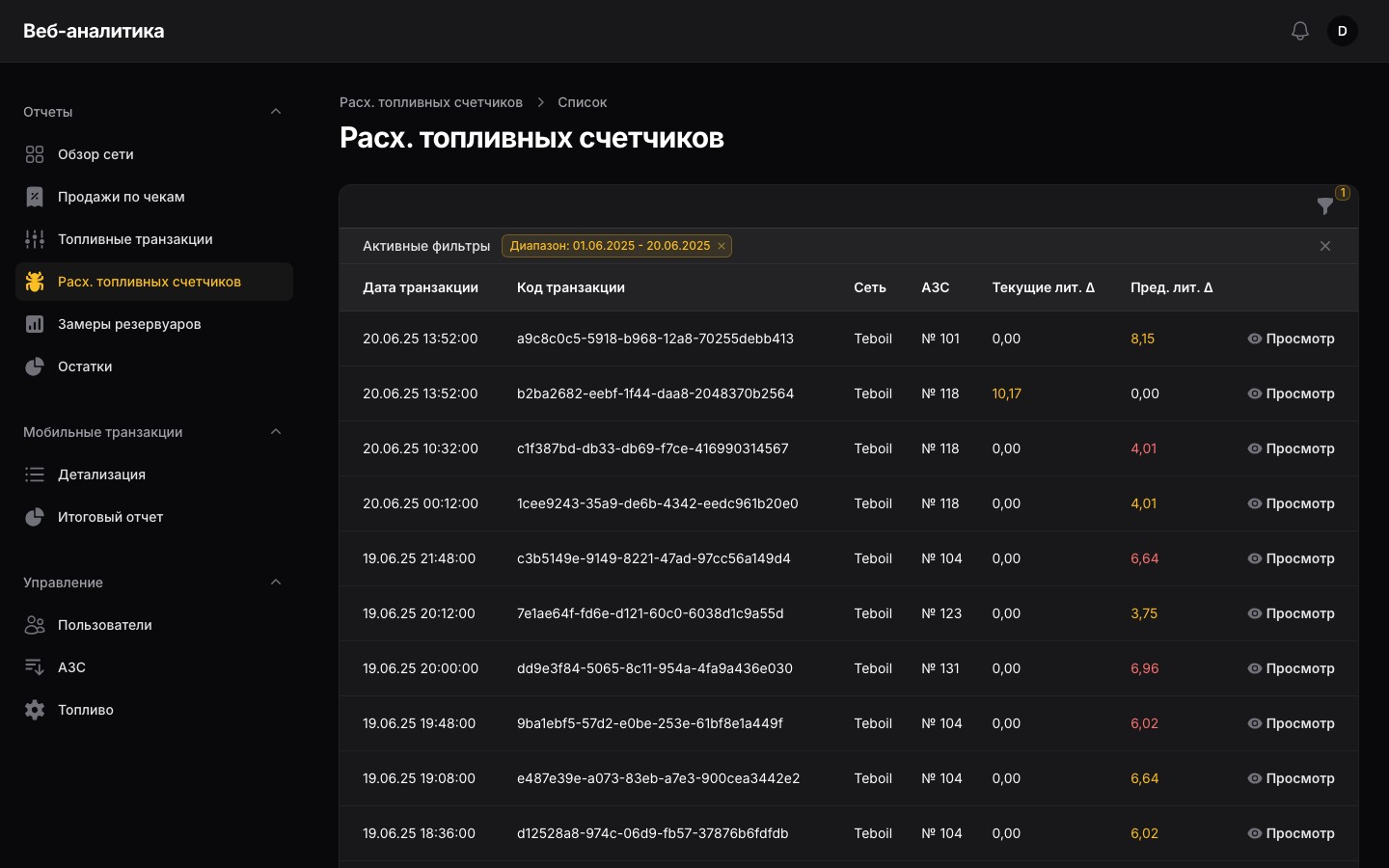
Fuel meter discrepancies: transactions with mismatched meter readings, plus and minus highlighted

Fuel meter discrepancies

Every night the panel checks the latest days' fuel transactions: whether the dispensed volume matches the change of the pump's totaliser and whether a transaction starts where the previous one on the same nozzle ended. Discrepancies over a litre go to a report, highlighted as plus or minus, and the detail card shows the transaction and the previous one. Next to it is the list of all fuel transactions with pump, nozzle, preset, price and meter readings.

Meter faults don't have to be hunted down by hand among thousands of transactions.

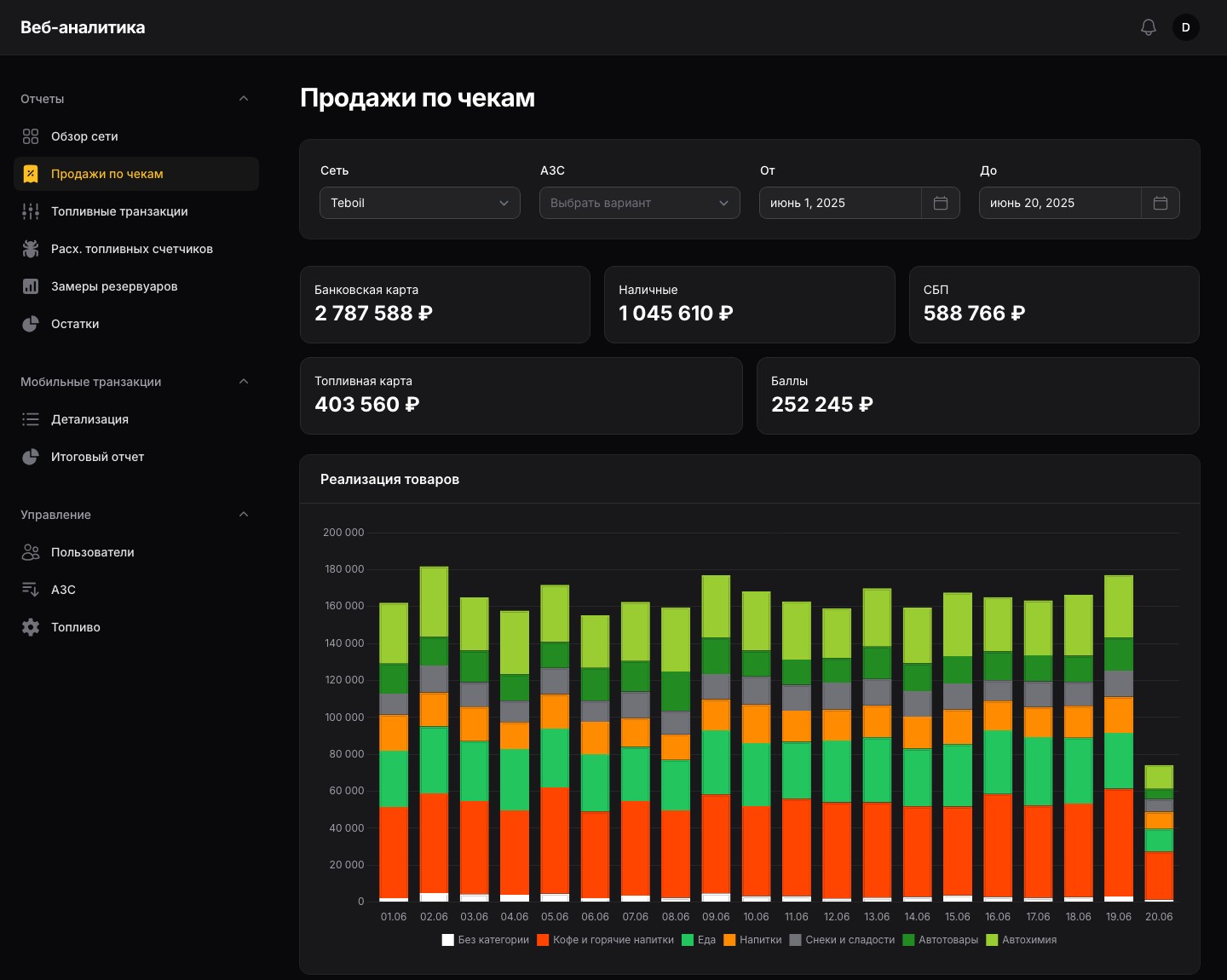
Receipt sales: revenue by payment method and product sales by category by day

Receipt sales

Shop revenue by payment method — card, cash, Faster Payments, fuel card, points — product sales by category by day and a category table with a total. Each category opens sales by product with sorting and paging.

It shows what the station shop sells and how customers pay for it.

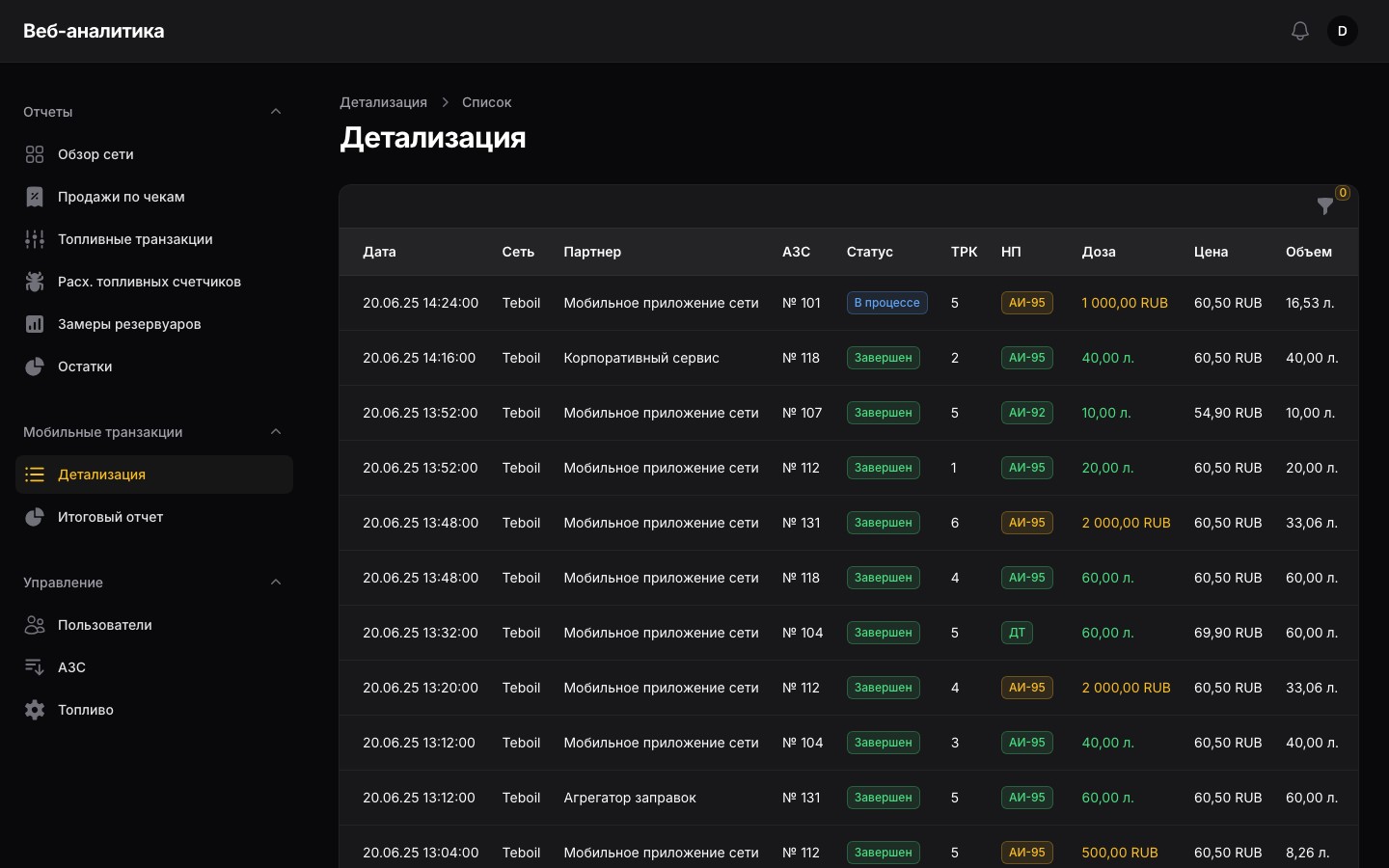
Mobile transactions: partner, station, pump, status, fuel, preset, price and volume

Mobile fuelling

Fuel orders from partners' apps: partner, station, pump, preset in litres or roubles, price, volume and status from “Accepted” to “Completed”, with search by external and internal ID. The status of a stuck transaction can be fixed by hand. The summary report gives litres and roubles per partner for the period.

Settlements with partners are checked against one report.

1 / 10
  • Scheduled ads

    While there is no customer at the till, the screen shows images and videos: each clip has its own dates, days of the week, hours, order and duration, and each promo uses one of five slide transitions. Clips, promos and the station groups they are assigned to live in the promo admin, which we extended with video alongside images, a schedule for each clip by dates, days of the week and hours, and sign-in with a one-time code sent by email. With no clips or no answer from the till service, the screen shows the network's logo and an error message rather than a blank screen.

    The pause between customers works as ad space — on the right days and hours.

  • Access, reference data and hourly stock

    An administrator creates the network's users and opens report sections to each of them separately; a network user sees only their own stations. Reference data covers stations with address, coordinates and an active flag, and each network's brand names for fuels, which appear in all reports. The “Stock” section shows each tank's first reading in the selected hour and exports it to a file.

    Every employee sees their own network and only the reports they need.

How it works

The customer display is a Vue web app that runs in a kiosk-mode browser on the till's second monitor and polls the till's local service; clips and schedules are managed in a Yii2 admin. The panel is Laravel and Filament on top of the client's statistics database in PostgreSQL. The heavy meter check runs at night as a separate command, in parallel by station, and the report reads a ready-made discrepancy table.

Timeline and scale

  1. February – March 2023 web version of the customer display: receipt, Faster Payments, fiscal QR code, ads.
  2. January 2024 design, layout and launch of the client's website.
  3. May – July 2024 first stage of the web analytics panel; promo admin and display updates: video, clip scheduling by dates, days of the week and hours, sign-in with an emailed code; an embeddable web configurator of settings based on JSON Schema.
  4. September – November 2024 second stage of the panel: fuel and station reference data, mobile transactions and the summary report, the meter discrepancy report. In November — an interactive prototype of the system and a functional specification.
  5. March 2025 third stage: user permissions by section, the “Stock” section with the latest readings and export.
  6. September – December 2025 receipt sales: detail by category and product, totals and sorting, updates to “Stock” and the discrepancy report.

Scale: three repositories and 156 commits — the customer display, the promo admin and the panel with 11 sections in three groups: reports, mobile transactions, management. Three more pieces of work under separate contracts and outside these repositories: the client's website, the configurator, the prototype with a specification.

What it gave the client

  • A customer display without a separate program

    The screen runs in a kiosk-mode browser: the till gets a monitor, not an application, and the workstation number is entered on the screen.

  • Faster Payments right from the till screen

    The QR code appears by itself as soon as the cashier picks Faster Payments.

  • Ad space at every till

    With no customer around, the screen shows scheduled ads — with dates, days of the week and hours.

  • The whole network in one panel

    Stock, fuel and shop sales, mobile fuelling and meter faults in one place, with per-section access for every employee.

  • The system finds meter faults

    A nightly check of pump readings replaces a manual search through transactions.

Technologies

Intégrations

Status

Project completed. We worked on it in 2023–2025: the customer display from February 2023, the web analytics panel from May 2024 to the last stage at the end of 2025.

Vous avez un projet similaire ?

Parlez-nous-en : nous répondons dans un délai d’un jour ouvré et proposons par où commencer.

Telegram: @spacetab_bot · E-mail: bip@spacetab.io